Issues
Everything that stops or weakens a result, from import to calculation.
An activity is calculated only when the values it needs are usable, it has a base sector, and Nios finds a factor for each environmental pressure (metric), such as GHG emissions. The Issues tab in the side panel lists what stands in the way, on every Collect page. This page explains the issues in the order they come up, and lists every issue Nios raises.
How issues work
Every issue is an error or a warning:
- Error: A value Nios can't use, such as an unknown currency or a missing base sector. Nios doesn't calculate the activity until you fix it. An error in a metric column stops only that metric. Activities without errors are calculated as usual.
- Warning: Something worth checking that doesn't stop the calculation, such as a regional factor used instead of a country factor. You can mark a warning as reviewed. It comes back if the finding changes.
Issues show as tinted cells in the grids, as counts next to the Collect pages in the sidebar, in the status bar above each grid, and in the Issues tab.
Status bar
When a Collect page has errors, its status bar turns red and shows how many there are. Step through the error cells with the arrows on its right. The counter shows where you are, for example 2/5. If the next error is in a row your current view hides, Nios shows the row anyway, and Back to filtered view returns you to your view.


Select a cell with an issue to read its message in the status bar. Click the message, or the warning count, to open the Issues tab.
Issues tab
Open the Issues tab with Open panel in the top right, or from the status bar.
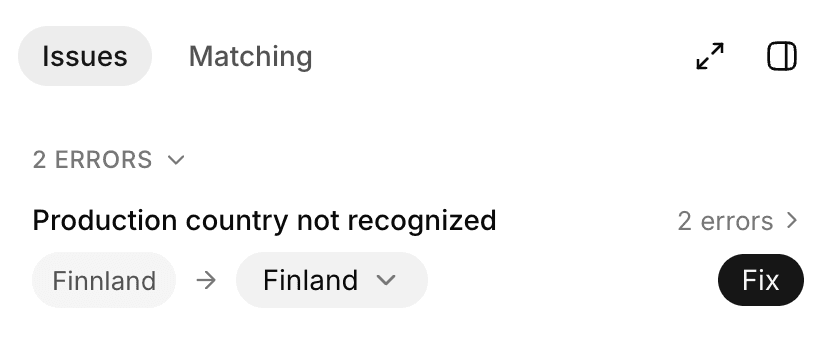
The Issues tab groups issues by message and value, errors first. Issues from matching and calculation follow under Matching. Reviewed warnings move to Reviewed, and Other modules links to issues on the other Collect pages. Show jumps to the affected cells in the grid.
One fix can solve a whole group:
- Replace with or Fill with: Pick one value, then click Fix to apply it to every row in the group. Nios preselects a close match, for example Finland for "Finnland".
- Add as entity: Creates the organization entity an activity names, so the reference works.
- Mark as reviewed: Accepts a warning.
Data issues
Nios checks every row when you import it and again on every edit, on all three Collect pages. Fix these first, because they decide what Nios can match and calculate. For the columns each stage needs, see What Nios needs.
Most data issues are values that are missing, paired without their partner, not a number, negative, or not in the list. An impact input with errors stops its metric on every activity that uses it. An organization entity with errors shows an error on the activities that name it, but they're still calculated. See the data issues reference.
Matching issues
After sector matching, some activities can still be without a base sector:
- No base sector match found: Sector matching found no sector that fits well enough. Make the Activity more specific or add the Supplier. Both edits retry matching. Or select a base sector yourself.
- Sector matching failed: The matching run failed for this activity. Click Match to retry, or select a base sector yourself.
Matching > Review lists these activities together with the matches worth checking. See Review and improve matches.
Calculation issues
With a base sector or impact input in place, Nios calculates each metric. A calculation issue means a value the calculation needs is missing, or there's no factor for the sector and country. An impact input that doesn't fit the activity, such as a unit mismatch, shows as a data issue on its metric cell instead. Depending on the issue, Nios can't calculate the whole activity or one metric.
Warnings at this stage mark results you should check, for example when Nios used a regional factor because the country has none, or when an activity has no spend and stays out of intensities. See the calculation issues reference.
Issue reference
The messages below are the exact text in the app. Values in braces, such as {metric}, are filled in for the row.
Data issues: Activities
| Message | Column | Severity | What to do |
|---|---|---|---|
| Missing activity | Activity | Error | Type the activity name |
| Duplicate activity name | Activity | Error | Rename the duplicates so each activity is unique |
| Needs spend+currency or quantity+unit | Spend, Currency, Quantity, Unit | Error | Add a spend with currency, or a quantity with unit |
| Spend without currency | Currency | Error | Select the currency |
| Currency without spend | Spend | Error | Add the spend amount |
| Quantity without unit | Unit | Error | Select the unit |
| Unit without quantity | Quantity | Error | Add the quantity |
| Spend is not a number | Spend | Error | Enter the spend as a number |
| Quantity is not a number | Quantity | Error | Enter the quantity as a number |
| Negative spend | Spend | Error | Enter a spend of zero or more |
| Negative quantity | Quantity | Error | Enter a quantity of zero or more |
| Year out of range | Activity year | Error | Select a year from 2018 to 2026 |
| Currency not supported | Currency | Error | Select an ISO currency code from the list |
| Unit not recognized | Unit | Error | Select a unit from the list |
| Production country not recognized | Country of production | Error | Select a country from the list |
| Purchase country not recognized | Country of purchase | Error | Select a country from the list |
| Country used not in list | Country used | Error | Select Production or Purchase |
| Not a supported base sector | Base sector | Error | Select a sector from the catalog, or click Match |
| Entity not in Organization entities | Entity name | Error | Fix the name, or choose Add as entity |
| Entity has errors in Organization entities | Entity name | Error | Fix the entity's errors on Organization |
| Impact input not found | Metric column | Error | Select an existing impact input, or fix its name |
| Impact input has errors | Metric column | Error | Fix the impact input's errors on Impact inputs |
Wrong metric: this impact input is for {metric} | Metric column | Error | Select an impact input for this column's metric |
| Result already used on another row | Metric column | Error | A Tier A result applies to one activity only. Create a separate result for this row |
Needs quantity and unit · {metric} | Metric column | Error | Add quantity and unit, or select a different impact input |
Unit mismatch: factor per {denominator}, row in {unit} | Metric column | Error | Align the activity's unit with the factor's denominator |
Needs spend and currency · {metric} | Metric column | Error | Add spend and currency, or select a different impact input |
| Sector not found | Metric column | Error | Select a sector from the current catalog |
| Sector country not recognized | Metric column | Error | Select a country from the list |
| Price per unit is not a number | Price per unit | Warning | Enter the price as a number |
| Negative price per unit | Price per unit | Warning | Enter a price of zero or more |
| Type not in list | Type | Warning | Select Physical goods, Services, or Digital |
| Scope category not in list | Scope category | Warning | Select 3.1 Purchased Goods & Services |
| Price type not in list | Price type | Warning | Select Basic, Purchaser, or Unknown |
Data issues: Organization
| Message | Column | Severity | What to do |
|---|---|---|---|
| Missing entity name | Name | Error | Name each entity |
| Duplicate entity name | Name | Error | Rename the duplicates so each entity is unique |
| Consolidation approach not in list | Consolidation approach | Error | Select Operational control, Financial control, or Equity share, or leave it empty |
| Differs from the consolidation approach used above | Consolidation approach | Error | Use one consolidation approach for all entities |
| Consolidation % is not a number | Consolidation % | Error | Enter the ownership share as a number |
| Negative consolidation % | Consolidation % | Error | Enter an ownership share between 0 and 100 |
| Consolidation % out of range | Consolidation % | Error | Enter an ownership share between 0 and 100 |
| Control approach needs 0 or 100 ownership | Consolidation approach, Consolidation % | Error | With Operational or Financial control, enter 0 or 100 |
| Include in boundary must be Yes or No | Include in boundary | Error | Select Yes or No |
| Type not recognized | Type | Warning | Select an entity type from the list |
| Country not recognized | Country | Warning | Select a country from the list |
| Revenue is not a number | Revenue | Warning | Enter the revenue as a number |
| Negative revenue | Revenue | Warning | Enter a revenue of zero or more |
| Revenue currency not supported | Revenue currency | Warning | Select an ISO currency code from the list |
| Employees is not a number | Employees | Warning | Enter the employee count as a number |
| Negative employees | Employees | Warning | Enter an employee count of zero or more |
| Not defined in Organization entities | Hierarchy level | Warning | Add the entity on Entities, or fix the name |
| Duplicate entity in hierarchy | Hierarchy level | Warning | Place each entity at one position in the hierarchy |
| Entity not in hierarchy | Name | Warning | Place the entity in the hierarchy |
An error on an entity also blocks the activities assigned to it. They show "Entity has errors in Organization entities" until you fix the entity.
Data issues: Impact inputs
| Message | Column | Severity | What to do |
|---|---|---|---|
| Missing input name | Input name | Error | Name each impact input |
| Duplicate input name | Input name | Error | Rename the duplicates so each impact input is unique |
| Missing metric | Metric | Error | Select the metric |
| Metric not in list | Metric | Error | Select a metric from the list |
| Missing tier | Tier | Error | Select A, B, or C |
| Tier not in list | Tier | Error | Select A, B, or C |
| Missing value | Value | Error | Enter the value |
| Value is not a number | Value | Error | Enter the value as a number |
| Negative value | Value | Error | Enter a value of zero or more |
| Denominator does not fit tier | Denominator | Error | Tier A: leave empty. Tier B: a quantity unit. Tier C: EUR or USD |
| Denominator not in list | Denominator | Error | Select a denominator from the list |
| Missing LCA activity | LCA activity | Error | Select Cradle-to-gate |
| LCA activity not in list | LCA activity | Error | Select Cradle-to-gate |
| Year out of range | Reference year | Error | Select a year from 2018 to 2026 |
| Input name uses reserved sector syntax | Input name | Warning | Rename the input so it can't be mistaken for a sector name |
| Reference region not in list | Reference region | Warning | Select a region, or Other and note the location in Comment |
Matching issues reference
| Message | Severity | What it means | What to do |
|---|---|---|---|
| No base sector match found | Error | Sector matching found no sector that fits well enough | Clarify the purchase in Activity and check Supplier. These edits retry matching. Or select a base sector |
| Sector matching failed | Error | The matching run failed for this activity | Click Match to retry, or select a base sector |
Calculation issues reference
| Message | Severity | Applies to | What it means | What to do |
|---|---|---|---|---|
| Missing spend | Error | Activity | The calculation path needs spend | Enter Spend and Currency, or select a quantity-based impact input |
| Missing activity year | Error | Activity | Nios needs a year to adjust spend to the factor's year | Select an Activity year |
| Missing production country | Error | Activity | Nios adjusts spend with the production country's inflation series | Select a Country of production |
| No deflator data for country | Error | Activity | The production country has no inflation series | Select the closest country with data, or use an impact input per metric |
| No exchange rate for currency | Error | Activity | No exchange rate covers this currency in the factor's year | Select another Currency, or use an impact input per metric |
| No metric sector found | Error | Metric | The base sector doesn't resolve to a sector for this metric | Select a sector or impact input in the metric cell, or change the base sector |
| No factor found | Error | Metric | No factor covers this sector and country, even after the regional and global fallbacks | Select another sector or impact input in the metric cell, or change the base sector or country |
| Review price type | Warning | Metric | The price type isn't Basic. Spend with taxes and margins can overstate results | Use spend without taxes and margins where you can, and set Price type to Basic |
| No factor reference year | Warning | Metric | The factor has no reference year, so Nios uses the spend without adjusting it | Check the factor's year and the result |
| Regional factor used | Warning | Metric | The sector has no factor for this country, so Nios uses the regional one | Review, or select a country or impact input |
| Continental factor used | Warning | Metric | The sector has no factor for this country, so Nios uses the continental one | Review, or select a country or impact input |
| Global factor used | Warning | Metric | The sector has no factor for this country, so Nios uses the global one | Review, or select a country or impact input |
| Not counted in intensities | Warning | Activity | The activity has no spend Nios can convert to the base currency, so it's left out of every intensity | Enter spend and currency, or check that exchange rates cover the activity year |